TheDinarian
News • Business • Investing & Finance
đŸ’„Persistence (XPRT) Wallet Setup GuideđŸ’„
January 01, 2023
post photo preview

Welcome to the Persistence Wallet Guide!

It can be confusing switching from one blockchain to another and understanding all the functionality of an unfamiliar wallet. Whether you’re new to the Cosmos ecosystem or have been using some of the other Tendermint-based chains, this guide should help you understand all of the important functions of the Persistence wallet.

This guide covers:

1. What is a Persistence Wallet

2. How to Create a Persistence Wallet

3. Importing an Existing Wallet (Using Mnemonics or Keplr)

4. How to Sign into the Wallet Dashboard

5. Wallet Dashboard Functions

6. Sending XPRT, Receiving XPRT and ‘Transactions’ Tab

7. Generating KeyStore File

8. Persistence Explorer

9. Help

Note: If you have already set up your wallet and are looking for the XPRT staking guide, read here.

1. What is a Persistence Wallet?

Persistence is an interoperable protocol built to facilitate the creation of next-gen financial products. XPRT is Persistence’s native token, which is used to secure the Persistence network. You need to have a Persistence wallet to store or transact using your XPRT tokens.

The Persistence wallet also allows you to stake your XPRT tokens to accrue staking rewards. Visit Explorer to check the latest APY.

2. How to Create a Persistence Wallet

Create a wallet or import one from an existing seed phrase.

To create a new wallet follow these steps:

Step 1: Create a Wallet

Navigate to https://wallet.persistence.one/ and click the ‘Create Wallet’ button.

Step 2: Read Notes

Please take a moment to carefully read notes about Persistence wallet. Once you have read through, proceed by clicking “Next”.

Step 3: Store Mnemonics

Write down and make sure you store your wallet Mnemonic (seed phrase) somewhere safe. Alternatively, you can click the Copy icon and paste it in a file location of your choice. Do not share your seed phrase with anyone, and remember, if someone has access to your Mnemonic, they have access to your wallet. Think of it as a master password that you wouldn’t want to be leaked.

You will need the seed phrase now in the next step of the setup phase and in future too.

Proceed by making sure each letter and each word is correctly stored. Once done, click the “Next” button.

(DO NOT USE THE MNEMONIC SHOWN ABOVE TO IMPORT THIS EXAMPLE WALLET AS ANYONE WILL BE ABLE TO ACCESS THIS GUIDE. THIS IS FOR EDUCATIONAL PURPOSES ONLY. THE MNEMONIC BELOW SHOULD NEVER BE UTILIZED.)

Step 4: Verifying Mnemonics

On the next screen you will see your Mnemonic but with some of the words missing. This is to ensure that you have safely recorded all the words in order.

Confirm that you have by filling in the missing terms of your mnemonic (seed phrase) in the correct order. Once you’re sure you have them correct, click “Submit”.

Step 5: Generating KeyStore File

If you’ve entered your mnemonic correctly, you will be greeted with a “Create Wallet” screen. Here, you can download and generate the KeyStore file.

The KeyStore file is an added layer of security, basically it’s an encrypted copy of your Mnemonic seed phrase with a password to enter the file. Once you generate the KeyStore file, secure the keystore.json file in a safe location.

You will need your KeyStore file and password to conduct transactions.

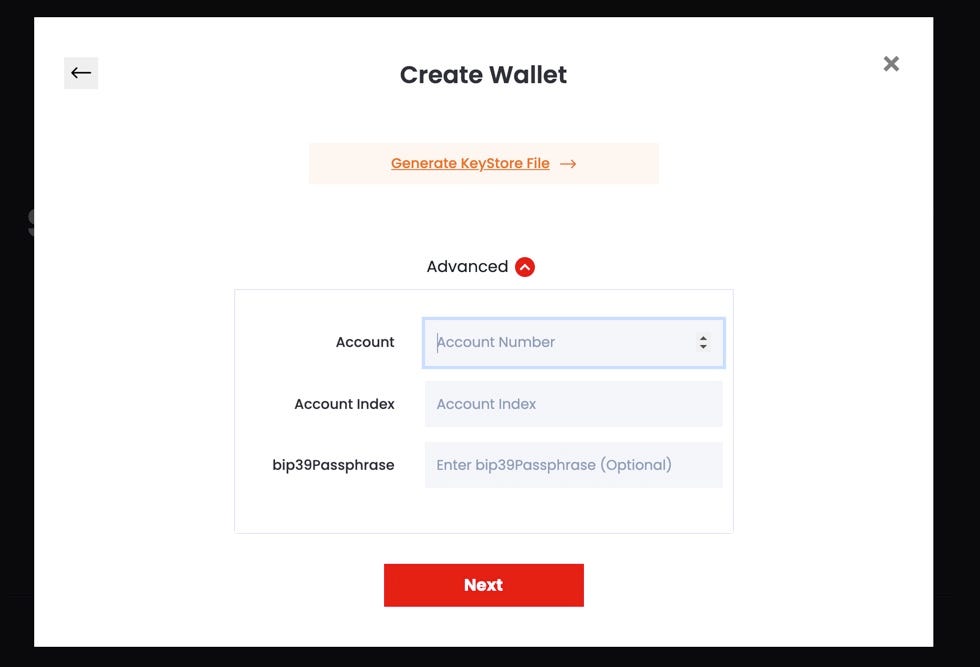
Step 5.1 (Optional): Create the HD Wallet Path

Optionally, click Advanced to create the HD (Hierarchical Deterministic) Wallet path and enter the Account, Account Index, and bip39Passphrase. Once complete, click “Next”.
Step 6: Create a Password to Encrypt Mnemonic

You will then enter a password to encrypt your mnemonic (seed phrase).

Note: This password does not help you generate your mnemonic (seed phrase). It is for use with your KeyStore file. After entering a password, your KeyStore file will download for you to save on your device. Once you are done, click “Submit”.

Step 7: Wallet Path & Address

You will then be shown your wallet path and wallet address. Ensure that you note the wallet path and address for future use. Once you have done so, Click ‘Done’.

You’re all set! You have now successfully created a Persistence wallet.

Now let’s learn how you can import an existing wallet.

3. Importing an Existing Wallet

If you already have a Persistence wallet, you can import it using the Import an existing wallet button. You will need to use your mnemonic and password. So keep it handy when you import a wallet.

Importing Your Wallet Using Mnemonics/Seed Phrase

Alternatively you can use Keplr. Keplr is a simple, open-source browser extension wallet for our ecosystem. You can add Keplr extension to your browser and sign into your wallet. It helps you sign into your wallet and transactions with ease.

 Add Kepler to Chrome.

Importing Your Wallet Using Keplr

4. How to Sign into the Wallet Dashboard

Step 1: Sign In

Head over to https://wallet.persistence.one/ and click on the “Sign In” button on the top right.

Step 2: Continue with Address

Click on the “Continue with Address” button.

Step 3: Submitting Address

Enter in your wallet address and click “Submit”.

That’s it, you’re now in the dashboard!

5. Wallet Dashboard Functions

The Wallet page tracks the following details of your wallet in the Wallet Balances region of the app for quick reference. This region is available in the Staking page as well. The wallet attributes in this region include:

  • Total Balance: Sum of the balance available to delegate, delegated amount, and XPRT token in unbonding state
  • Delegatable Balance: Indicates the number of XPRT token you can delegate
  • Delegated Amount: Indicates the number of XPRT token you have already delegated
  • Vesting Balance: Indicates the number of XPRT token in vesting (locked) state
  • Transferable Amount: Indicates the number of XPRT token that you can transfer
  • Current Price of each token in USDT
  • Current Value of XPRT in USDT
  • Rewards: Indicates the staking rewards
  • ‘Claim’ Button: Option to claim staking rewards
  • Unbonding Token: Indicates the number of XPRT tokens that are in unbonding state. Click the ‘View’ link to view the unbonding XPRT schedule details. If you have no unbonding tokens, then the View link does not appear.

The Wallet page has 3 tabs:

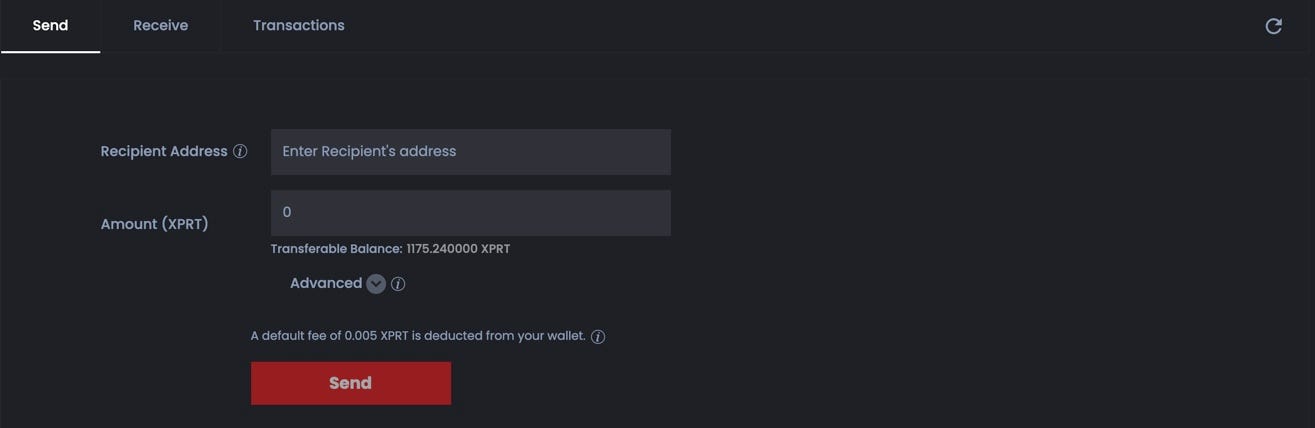
  • Send: Send your XPRT tokens to another person with a Persistent wallet.
  • Receive: Find your wallet ID. Copy and share it with others who want to send you XPRT tokens. Scan the QR code for your address to share or reveal it.
  • Transactions: All your transactions are tracked in this tab in a table with these attributes: Transaction Hash, Transaction Type, Transaction Result, Transaction Amount, Transaction Fee, Block Height, and Transaction Time. You can filter the sent and received transactions using the ‘Sent’ and ‘Received’ buttons in the Transactions tab.

*Use the Refresh icon to view the latest details after transacting in the app.
6. Sending XPRT, Receiving XPRT and ‘Transactions’ Tab

Sending XPRT Tokens

Sending XPRT Tokens Using Mnemonics/Seed Phrase
Sending XPRT Tokens Using Keplr

You may want to send some XPRT to someone who has a Persistence wallet.

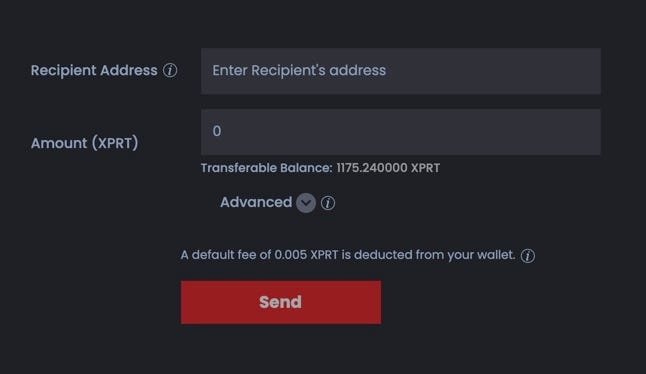
  1. From the Wallet page, Send tab, copy and paste Recipient Address. You obtain their wallet address from the application.
  2. Enter the Send Amount.
  3. Optionally, click Advanced and enter your comments or remarks in Memo. Don’t provide any sensitive information such as password or mnemonic in this Memo field. Centralized exchanges use this info to identify a transaction when crediting to an account.

The application calculates the transaction fee in XPRT token and is deducted from your wallet.

4. Click Send.
5. Sending will require that you enter your KeyStore file and wallet password. Upload your KeyStore file, and then enter your password.

A confirmation message appears after you have successfully sent the XPRT tokens. Click the transaction hash link and view the details or you can review the details under the Transactions tab.

6. Click Done to return to the Wallet page.

Receive XPRT Tokens

Within the “Receive” tab, you are able to view your wallet address to send to users who would want to send you XPRT.

Copy the Wallet Address and share it with others to receive your XPRT tokens.
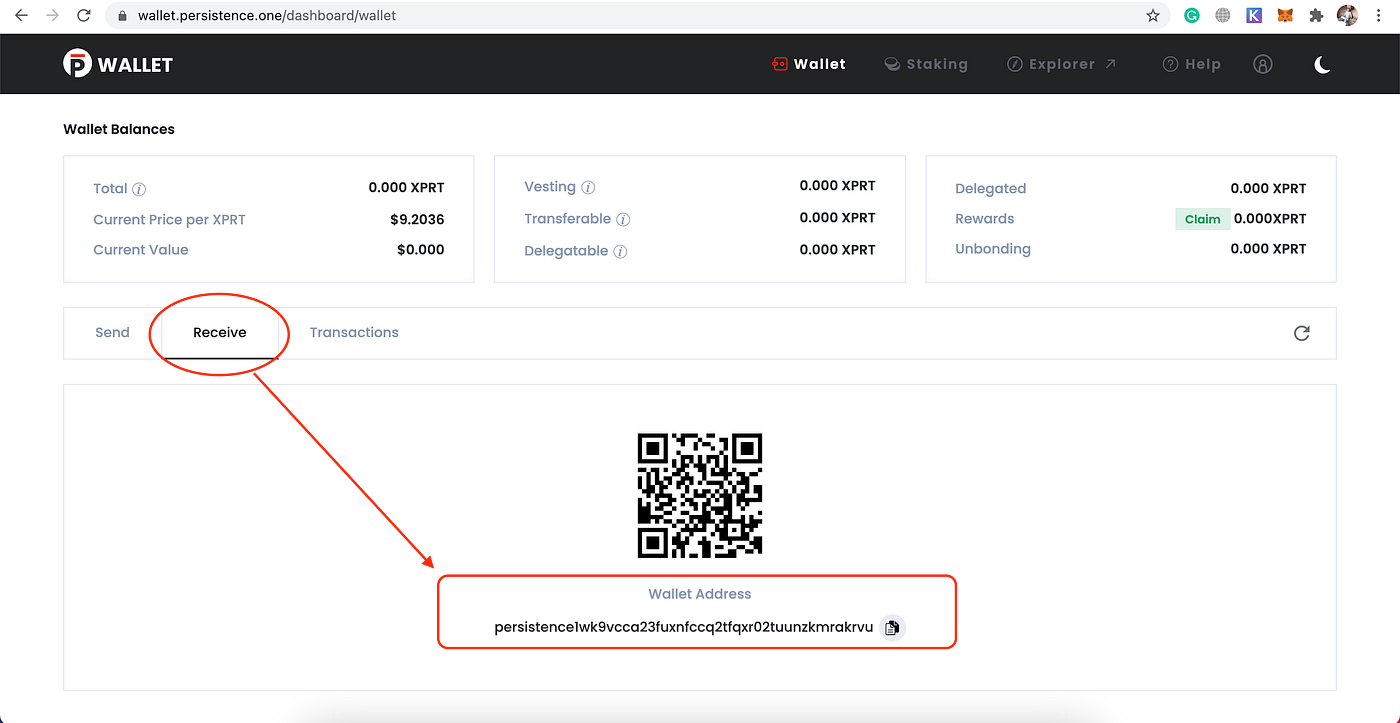
You can also find your wallet address in the user profile menu in the top right of the app.

Transactions Tab

Within the “Transactions” tab, users are able to view their recent transactions and monitor their wallet activity.

7. Generating KeyStore File

If you lose your KeyStore file or need to download another, you can do so using your Mnemonics/seed phrase.
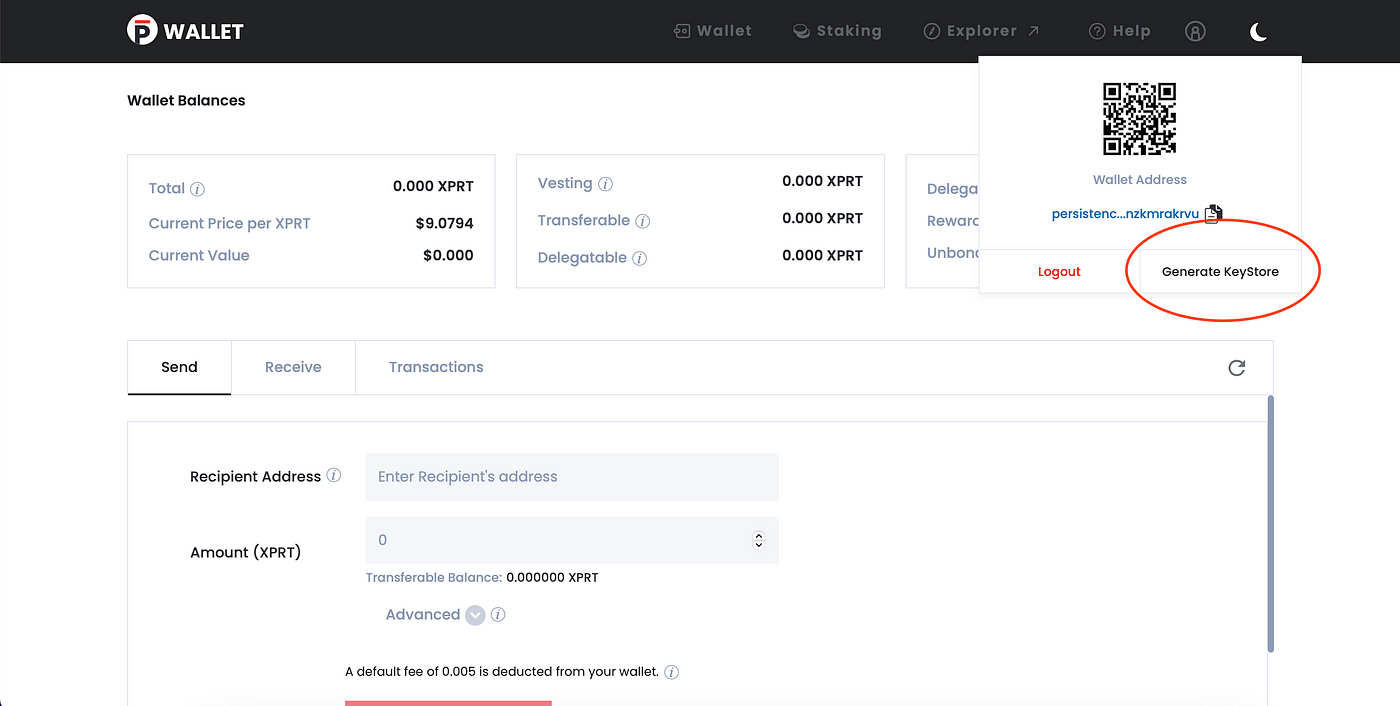
  1. Click the user profile icon at the top right and click the Generate KeyStore button.
  2. Copy or enter your mnemonics/seed phrase and click Next.
  3. Enter Password. Your password encrypts your seed phrase. Note that this password does not help you generate your seed phrase, it is for use with your KeyStore file.
  4. Click Submit. Note that the KeyStore file is generated and saved to your local Downloads folder. Rename the file if you want to and move it to a location of your choice. Keep it handy so that you can use it when required.

8. Persistence Explorer

When you click the Explorer in the global region, it takes you to the Persistence Explorer app. Information is segregated and placed in various cards in the your dashboard:

  • Latest Block: Indicates the block height, who proposed it, its time stamp in UTC, and average block time (100000 blocks)
  • Tokens: Includes the inflation, bonded tokens, bonded amount, total supply, and the community pool.
  • Voting Powers: The voting power is calculated based on the number of tokens staked with the validator. Graphically represents the active validators and their voting power percentage.
  • Recent Activity: Indicates the important blockchain notifications related to validators such as validator missing blocks or getting jailed and changing commission rate.

The others pages in the Persistence Explorer app include:

  • Blocks page: The latest block and other blocks information appears here.
  • Transactions page: You can find your transactions by transaction type, status and time.
  • Validators page: View the active and inactive validators, their voting power, commission rate, and delegated amount. You can order the table and quickly search for a validator too. Use the validator link and view the specific details of the validator.
  • Proposals page: View suggestions for the better functioning of the blockchain. These proposals aid in voting.

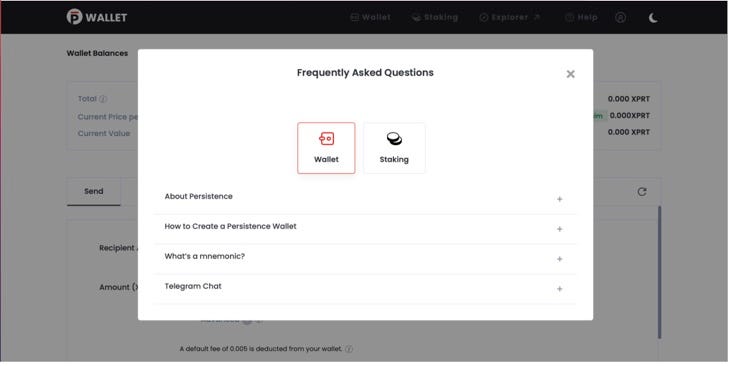
9. Help

Go to the app help for all Wallet and Staking related FAQs

Here, you will find sections for frequently asked questions of all kinds, and a link to our Telegram group.

Hopefully, you are now fully equipped with the knowledge you need to be able to set up and use the Persistence wallet and be able to send & receive transactions. In case you have any questions, we remain at your disposal as always. Don’t hesitate to reach out to us!

About Persistence

Persistence is a Tendermint-based, specialised Layer-1 network powering an ecosystem of DeFi applications focused on unlocking the liquidity of staked assets.

Persistence facilitates the issuance and deployment of liquid-staked stkASSETs, allowing users to earn staking rewards while participating in DeFi primitives, such as lending/borrowing and liquidity provisioning on DEXs.

Persistence aims to offer a seamless staking and DeFi experience for PoS (Proof-of-Stake) users and enable developers to build innovative applications around stkASSETs.

Join Our Movement

Twitter | LinkedIn | Telegram | YouTube | Reddit | [email protected]

Link

community logo
Join the TheDinarian Community
To read more articles like this, sign up and join my community today
0
What else you may like

Videos
Podcasts
Posts
Articles
🚹 There was a time when the US military knew exactly who the real enemy was—Britain.

Trump is reviving that clarity.

From Greenland to housing cartels, he's dismantling 80 years of imperial control over American policy.

👇 Watch 👇

00:12:39
Catherine Austin Fitts:

Catherine Austin Fitts:

"The bankers [have] put Trump in to get the control grid for them... [but] everybody wants... their own control grid. The Chinese and the Russians don't want the City of London controlling their CBDC... [so these powers are] fighting with each other."

This clip of Fitts, a former Assistant Secretary of Housing and Urban Development, investment banker, and founder of the Solari Report (@solari_the), is taken from a discussion with CapitalCosm (@CapitalCosm) posted to YouTube on January 10, 2026.

----------------Partial transcription of clip---------------

"What happened was, when the administration came in, I had said in 2024, the bankers are going to put Trump in to get the control grid for them. And in fact, that's what happened. But it was moving so quickly, Danny, I literally, I would do an interview like this, and I couldn't remember all the things he'd done last week. They were moving so fast.

"So we just started to make a collection and I could send people and ...

00:02:40
We Are Heading Into The World Of AIđŸ€–

Elon Musk's jaw-dropping prediction (Jan 2026):

“Don’t go into medical school.”
Elon Musk: “Yes. Pointless, any school.”

In 3 years (2029), Optimus robots will be better surgeons than any human on Earth — at scale.

By 4–5 years? Not even close. The best medicine in the world will be free — 👉better than what the President gets today.

1:19 clip — the moment Elon says goodbye to traditional medicine forever 👇

3–5 years until AI surgeons dominate?

00:01:19
👉 Coinbase just launched an AI agent for Crypto Trading

Custom AI assistants that print money in your sleep? 🔜

The future of Crypto x AI is about to go crazy.

👉 Here’s what you need to know:

💠 'Based Agent' enables creation of custom AI agents
💠 Users set up personalized agents in < 3 minutes
💠 Equipped w/ crypto wallet and on-chain functions
💠 Capable of completing trades, swaps, and staking
💠 Integrates with Coinbase’s SDK, OpenAI, & Replit

👉 What this means for the future of Crypto:

1. Open Access: Democratized access to advanced trading
2. Automated Txns: Complex trades + streamlined on-chain activity
3. AI Dominance: Est ~80% of crypto 👉txns done by AI agents by 2025

🚹 I personally wouldn't bet against Brian Armstrong and Jesse Pollak.

👉 Coinbase just launched an AI agent for Crypto Trading
⚠ Ripple Secures Preliminary Electronic Money Institution license 🚀

We’ve secured our preliminary Electronic Money Institution license approval from Luxembourg’s Commission de Surveillance du Secteur Financier (CSSF). đŸ‡ȘđŸ‡ș

This is a pivotal step toward scaling Ripple Payments across the EU, bringing institutional-grade digital asset infrastructure to the region. on.ripple.com/49D0FjW

The momentum is global:

→ 75+ licenses & registrations worldwide
→ $95B+ in volume processed to date
→ Reaching 90% of daily FX markets

With the EU taking the lead in building a regulatory framework for digital assets, we're helping institutions transition from pilots to commercial scale, and we’re bridging the gap between legacy finance and the digital future to unlock trillions in dormant capital.

https://x.com/i/status/2011363419501347177

@usbank is testing custom issuance of its own stablecoin on Stellar.

Stellar’s stablecoin market cap increased 53% YoY. The market cap of RWAs on Stellar increased 196% to $890.2 million. Get the latest from @MessariCrypto.

Lights out and away we go!

https://messari.io/report/stellar-financial-ecosystem-update

post photo preview
⚠ More Secret Than The Atomic Bomb ⚠

⚠ More Secret Than The Atomic Bomb ⚠

A deep dive into the triangular UAP seen throughout the United States and the world for decades. With the Immaculate Constellation report, at least SOME equilateral and isosceles triangle craft have been identified as reproduction and Alien Reproduction Vehicles.

Numerous sightings and whistleblower testimony have lent evidence to the thesis DOD and private contractors have operated reverse-engineered triangular craft out of key military bases since at least the 1980s. Key testimonies here include: Edgar Fouche and the TR-3b reverse-engineered triangle, US sightings from 1980-2000, and a strange illustration of a triangular craft called the XF-131 Super Sentinel.

Was Edgar Fouche's testimony of TR-3B and Area 51 programs true? How many prototype and operational triangle ARVs have been constructed? Why did the X-Files contract the work of an allegedly real triangle ARV out of Lockheed Martin's Helendale Plant?

00:00​ Intro
03:27​ Triangle ARV ...

post photo preview
🚹David Grusch on The Megyn Kelly Show🚹

Earlier this week, UFO/UAP whistleblower David Grusch appeared on The Megyn Kelly Show for a brief but revealing interview. During the conversation, Grusch named individuals he claimed were involved in managing the alleged UFO/UAP Legacy crash retrieval program, statements that immediately drew attention across the disclosure community.

Most notably, Grusch asserted that former Vice President Dick Cheney played a central role in overseeing the program. Cheney’s name has circulated within UFO/UAP research circles for years, but this marks the first time it has been spoken publicly by a former intelligence official who claims direct knowledge of the issue. It is also notable that just weeks ago, journalist Ross Coulthart independently referenced Cheney in a similar context, lending additional weight to the consistency of these claims.

Grusch also named former Director of National Intelligence James Clapper, stating that Clapper was not only aware of the crash retrieval issue, but managed it and helped place individuals into key roles, both publicly and behind the scenes. These are serious assertions that warrant scrutiny and further investigation, given their potential implications for disclosure.

Please watch the full interview and consider its significance within the broader context of the disclosure conversation. Please note that the interview concludes with a paid promotional pitch, and Grusch does not provide any additional comments after the pitch.


  🙏 Donations Accepted, Thank You For Your Support 🙏

If you find value in my content, consider showing your support via:

💳 Stripe:
1) or visit http://thedinarian.locals.com/donate

💳 PayPal: 
2) Simply scan the QR code below đŸ“Č or Click Here: https://www.paypal.com/donate/?business=8K3TZ2YFZ7SMU&no_recurring=0&item_name=Support+Crypto+Michael+%E2%9A%A1+Dinarian+on+Locals+Blog&currency_code=USD


🔗 Crypto Donations Graciously Accepted👇
XRP: r9pid4yrQgs6XSFWhMZ8NkxW3gkydWNyQX
XLM: GDMJF2OCHN3NNNX4T4F6POPBTXK23GTNSNQWUMIVKESTHMQM7XDYAIZT
XDC: xdcc2C02203C4f91375889d7AfADB09E207Edf809A6


Read full Article
post photo preview
Stellar CEO Reveals Where Real Opportunity Lies in Crypto Market: Details

In a recent tweet, Stellar Development Foundation (SDF) CEO and Executive Director Denelle Dixon defines what "real opportunity" is in blockchain as a new financial future beckons.

The SDF CEO was reacting to a recent Bloomberg report on Bank of New York Mellon Corp (BNY), Nasdaq, S&P Global and iCapital participation in a new $50 million investment round by Digital Asset Holdings. This comes as some of Wall Street’s biggest names embrace the technology that underpins cryptocurrencies to handle traditional assets.

Reacting to this development, Stellar Foundation CEO Denelle Dixon stated that every blockchain investment is a bet on a different financial future. Dixon added that seeing banks explore blockchain technology validates what has been known over the years.

Real opportunity defined

While Wall Street’s biggest names betting on blockchain might be one of the most significant adoption milestones in the digital asset market, Dixon defines what real opportunity is and what it is not.

According to the SDF executive director, real opportunity is not replicating old systems on new rails but rather building open networks that fundamentally expand global finance participation.

"But the real opportunity isn’t replicating old systems on new rails—it’s building open networks that fundamentally expand who gets to participate in global finance. That’s the opportunity," Dixon tweeted.

At the Meridian 2025 event, Stellar outlined its long-term privacy strategy, committing to investing in critical privacy infrastructure and building foundational cryptographic capabilities.

Stellar eyes privacy upgrade

A new protocol upgrade is on the horizon for the Stellar network: X-Ray, which lays the groundwork for developers to build privacy applications on Stellar using zero-knowledge (ZK) cryptography.

The protocol timeline testnet vote is anticipated for Jan. 7, 2026, while the mainnet vote is expected for Jan. 22, 2026.

Source

  🙏 Donations Accepted, Thank You For Your Support 🙏

If you find value in my content, consider showing your support via:

💳 Stripe:
1) Visit http://thedinarian.locals.com/donate

💳 PayPal: 
2) Simply scan the QR code below đŸ“Č or Click Here: 

🔗 Crypto Donations Graciously Accepted👇
XRP: r9pid4yrQgs6XSFWhMZ8NkxW3gkydWNyQX
XLM: GDMJF2OCHN3NNNX4T4F6POPBTXK23GTNSNQWUMIVKESTHMQM7XDYAIZT
XDC: xdcc2C02203C4f91375889d7AfADB09E207Edf809A6

Read full Article
post photo preview
XDC Network's acquisition of Contour Network

XDC Network's acquisition of Contour Network marks a silent shift to connect the digital trade infrastructure to real-time, tokenized settlement rails.

In a world where cross-border payments still take days and trap trillions in idle liquidity, integrating Contour’s trade workflows with XDC Network Blockchains' ISO 20022 financial messaging standard to bridge TradFi and Web3 in Trade Finance.

The Current State of Cross-Border Trade Settlements

Cross-border payments remain one of the most inefficient parts of global finance. For decades, companies have inter-dependency with banks and their correspondent banks across the world, forcing them to maintain trillions of dollars in pre-funded nostro and vostro balances — the capital that sits idle while transactions crawl across borders.

Traditional settlement is slow, often 1–5 days, and often with ~2-3% in FX and conversion fees. For every hour a corporation can’t access its own cash increases the cost of financing, tightens liquidity that could be used for other purposes, which in turn slows economic activity.

Before SWIFT, payments were fully manual. Intermediary banks maintained ledgers, and reconciliation across multiple institutions limited speed and volume.

SWIFT reshaped global payments by introducing a secure, standardized messaging infrastructure through ISO 20022 - which quickly became the language of money for 11,000+ institutions in 200 countries.

But SWIFT only fixed the messaging — not the movement. Actual value still moves through slow, capital-intensive correspondent chains.

Regulated and Compliant Stablecoin such as USDC (Circle) solves the part SWIFT never could: instant, on-chain settlement.

Stablecoin Settlement revamping Trade and Tokenization

Stablecoin such as USDC is a digital token pegged to the US Dollar, still the most widely used currency for trade, enabling the movement of funds instantly 24*7 globally - transparently, instantly, and without the need for any intermediaries and the need to lock in trillions of dollars of idle cash.

Tokenized settlement replaces multi-day reconciliation with on-chain finality, reducing:

  • Dependency on intermediaries
  • Operational friction
  • Trillions locked in idle liquidity

For corporates trapped in long working capital cycles, this is transformative.

Digital dollars like USDC make the process simple:

Fiat → Stablecoin → On-Chain Transfer → Fiat

This hybrid model is already widely used across remittances, payouts, and treasury flows.

But one critical piece of global commerce is still lagging:

👉 Trade finance.

The Missing link is still Trade Finance Infrastructure.

While payments innovation has raced ahead, trade finance infrastructure hasn’t kept up. Document flows, letters of credit, and supply-chain financing remain siloed, paper-heavy, and operationally outdated.

This is exactly where the next breakthrough will happen - and why the recent XDC Network acquisition of Contour is a silent revolution.

It transforms to a new era of trade-driven liquidity through an end-to-end digital trade from shipping docs to payment confirmation – one infrastructure that powers all.

The breakthrough won’t come from payments alone — it will come from connecting trade finance to real-time settlement rails.

The XDC + Contour Shift: A Silent Revolution

  • Contour already connects global banks and corporates through digital LCs and digitized trade workflows.
  • XDC Blockchain brings a settlement layer built for speed, tokenization, and institutional-grade interoperability and ISO 20022 messaging compatibility

Contour’s digital letter of credit workflows will be integrated with XDC’s blockchain network to streamline trade documentation and settlement.

Together, they form the first end-to-end digital trade finance network linking:

Documentation → Validation → Settlement all under a single infrastructure.

XDC Ventures (XVC.TECH) is launching a Stable-Coin Lab to work with financial institutions on regulated stablecoin pilots for trade to deepen institutional trade-finance integration through launch of pilots with banks and corporates for regulated stable-coin issuance and settlement.

The Bottom Line

Payments alone won’t transform Global Trade Finance — Trade finance + Tokenized Settlement will.

This is the shift happening underway XDC Network's acquisition of Contour is the quiet catalyst.

Learn how trade finance is being revolutionised:

https://www.reuters.com/press-releases/xdc-ventures-acquires-contour-network-launches-stablecoin-lab-trade-finance-2025-10-22/

Source

🙏 Donations Accepted, Thank You For Your Support 🙏

If you find value in my content, consider showing your support via:

💳 Stripe:
1) or visit http://thedinarian.locals.com/donate

💳 PayPal: 
2) Simply scan the QR code below đŸ“Č or Click Here: 

🔗 Crypto Donations Graciously Accepted👇
XRP: r9pid4yrQgs6XSFWhMZ8NkxW3gkydWNyQX
XLM: GDMJF2OCHN3NNNX4T4F6POPBTXK23GTNSNQWUMIVKESTHMQM7XDYAIZT
XDC: xdcc2C02203C4f91375889d7AfADB09E207Edf809A6


Read full Article
See More
Available on mobile and TV devices
google store google store app store app store
google store google store app tv store app tv store amazon store amazon store roku store roku store
Powered by Locals